xoegit: Let AI Handle Your Git Commits (So You Don't Have To)
Look, we've all been there. You've just spent three hours refactoring your codebase, fixing a nasty bug, and adding a new feature - all in the same session. Now comes the hard part: writing commit messages. Your brain is fried, and all you can come up with is git commit -m "stuff" or the classic git commit -m "fix things".
Yeah, we need to talk about that.
The Problem With Git Commits (And Why We're All Guilty)
Writing good commit messages is one of those things every developer knows they should do, but honestly? Most of us don't. Research shows that a significant portion of commits in open-source projects fail to follow basic conventions or provide meaningful context. And let's be real - when you're in the zone, the last thing you want to do is context-switch to crafting the perfect semantic commit message.
However, here's the thing: bad commit messages make your codebase harder to navigate, debug, and collaborate on. They're technical debt in disguise. And if you've ever tried to debug something at 3 AM using git log as your only guide, you know exactly what I'm talking about. (Spoiler: "fixed stuff" is not helpful when you're trying to figure out why the authentication suddenly broke.)
Enter xoegit.
What Is xoegit?
xoegit is an AI-powered CLI tool I built to solve exactly this problem. It analyzes your git diff, git status, and git log, then uses Google's Gemini AI to generate proper, semantic commit messages that actually make sense. Think of it as your personal commit message ghostwriter - except it's way faster and doesn't judge your 2 AM code. (Though it might silently question why you're pushing to production at 2 AM, but that's between you and your CI/CD pipeline.)
The philosophy behind xoegit is simple: "Craft, Don't Code." The tool suggests commands, but you're the one who executes them. You stay in control. No rogue AI commits here.
Why This Matters
If you've ever worked on a team project (or even your own project six months later), you know the pain of trying to understand what a commit actually did. The Conventional Commits specification exists for a reason - it creates a standardized format that makes commit history readable and meaningful.
But following conventions consistently? That's where humans struggle. That's where AI can help. I mean, we can build self-driving cars but can't consistently write proper commit messages. The irony is not lost on me.
How xoegit Works
The beauty of xoegit is in its simplicity. Here's what happens when you run it:
- It scans your repo - Checks your staged files, diffs, and recent history
- It adds context - You can optionally provide context with
--context "refactoring auth module"for even better suggestions - It suggests atomic commits - Instead of one massive commit, it breaks your changes into logical, focused commits
- It generates PR descriptions - Bonus: it also creates ready-to-use PR titles and descriptions
Here's a real example:
xoegit --context "adding user authentication"
Output:
commit 1
git add src/auth/login.ts
git commit -m "feat(auth): add login validation"

commit 2
git add src/utils/logger.ts
git commit -m "refactor(utils): improve error logging"

pr title: feat(auth): implement secure login
pr description: feat(auth): implement secure login
- feat(auth): add login validation
- refactor(utils): improve error logging
Notice how it:
- Follows the
type(scope): descriptionformat - Creates separate commits for different concerns
- Generates a cohesive PR description
No more "implemented stuff" commits. Your future self will thank you.
The Tech Stack
I built xoegit with TypeScript and Node.js, leveraging Google's Gemini API. One feature I'm particularly proud of is the intelligent model fallback system. If one model hits its rate limits, xoegit seamlessly switches to another without interrupting your workflow. This approach draws inspiration from recent trends in resilient AI development tools, where reliability matters just as much as performance.
It's like having a backup quarterback ready to step in when the starter gets benched - except less dramatic and with fewer angry sports fans.
Real-World Benefits
Since I started using xoegit on my own projects, I've noticed a few things with genuine conviction:
- Consistency - My commit history actually follows conventions now (shocking, I know)
- Time savings - No more staring at the terminal trying to think of a commit message while your coffee gets cold
- Better collaboration - Team members can quickly understand what changed and why, without needing a PhD in cryptic commit archaeology
- Atomic commits - I naturally break down changes into smaller, logical chunks instead of the dreaded "refactored everything" commit
Studies on software engineering productivity suggest that clear commit messages can significantly reduce code review time, which means less back-and-forth and faster merges. Translation: more time for actual coding, less time playing commit message detective.
Getting Started
Installing xoegit is straightforward:
npm install -g xoegit
You'll need a Google Gemini API key (free tier available), which xoegit will prompt you for on first run. Your key is stored locally - no cloud servers involved.
Then, from whatever project you're working on, just run:
xoegit
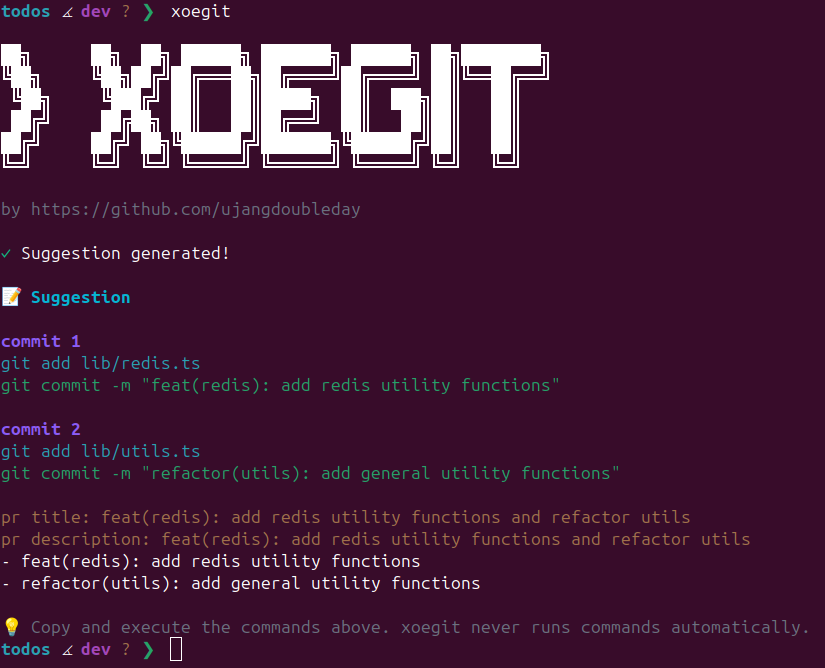
That's it. The tool does the rest. Seriously, it's easier than remembering the difference between git rebase and git merge.
Security & Privacy
One thing I want to emphasize with absolute conviction: xoegit doesn't collect or store your data. Your API key lives on your machine, and your code never leaves your local environment except for the API call to Gemini (which is necessary for the AI suggestions). I designed it following privacy by design principles, because developer tools should respect your privacy.
However, if you're still paranoid (and hey, in this industry, that's called "being properly cautious"), you can always review the source code. It's open source for a reason.
The Future of Dev Tools
AI-powered development tools aren't just a trend - they're becoming part of the standard workflow. From GitHub Copilot writing code to Cursor handling entire features, AI is augmenting how we build software.
xoegit fits into this ecosystem by tackling one specific problem: making your git history actually useful. It's not trying to replace you; it's trying to handle the boring parts so you can focus on what matters. Because let's face it - nobody became a developer because they were passionate about writing commit messages. (If you did, we need to talk.)
Try It Out
If you're tired of your commit history looking like a stream of consciousness from a sleep-deprived developer (no judgment - we've all been there, probably multiple times this week), give xoegit a shot.
Check out the GitHub repo and let me know what you think. Contributions are welcome, too - it's open source under the MIT license.
Because at the end of the day, life's too short for bad commit messages.
Built with TypeScript, powered by Gemini AI, and fueled by my own frustration with bad commit messages. And caffeine. Lots of caffeine.